
In SEO data analysis, search engine algorithm research, and compliance-oriented reporting, SERP data reproducibility is a core pain point: for the same keyword in the same time window, SERP results often show inconsistencies. Without a standardized system for logging, snapshots, and audit trails, critical tasks such as ranking fluctuation analysis, algorithm change validation, and data audits become hard to defend.
This guide explains the root causes of SERP non-determinism and shows how to achieve end-to-end reproducibility using logging, snapshot retention, and audit trails, with practical examples and Python code.
1. Why SERP Results Are Non-Deterministic
Even with identical keywords, SERPs cannot guarantee 100% consistency in ranking order, entry content, block composition, and display style. These differences are not necessarily “errors” but an inherent outcome of system design, personalization, geo/infra variance, and real-time dynamics.
Simply put: there is no single, eternal, and unconditionally reproducible SERP for the same keyword.
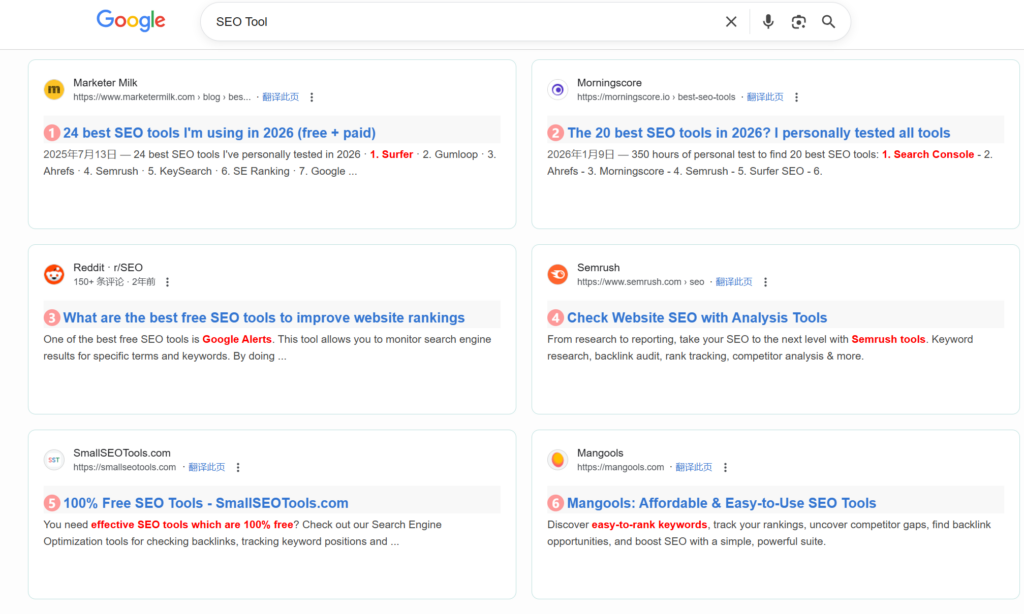
Example: Search results for the keyword “SEO Tool” on Google with and without account login:
- Results without logging into a Google account:
Results after logging into a Google account:
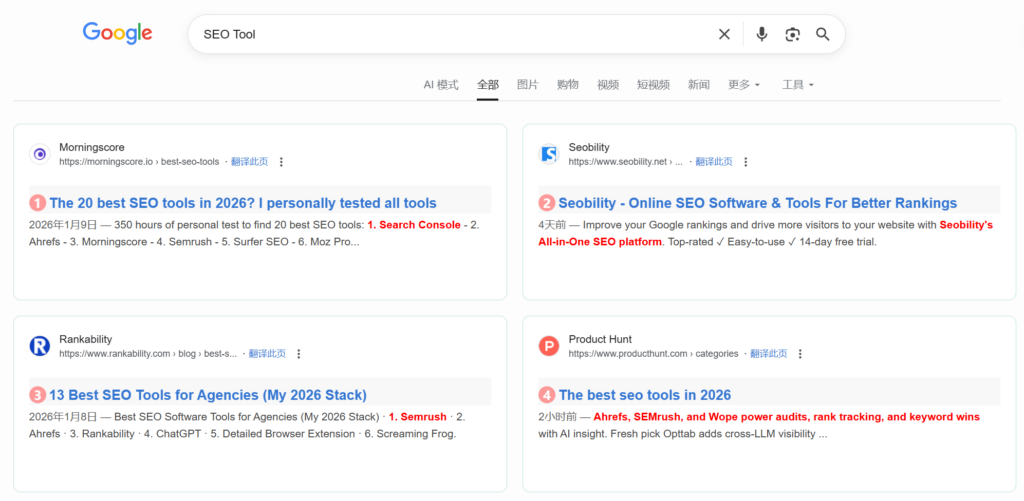
Because SERP is inherently non-deterministic, you must artificially construct reproducible observation conditions by persisting full parameters, logs, and snapshots.
1.1 Typical Manifestations of SERP Non-Determinism
1.1.1 Organic Ranking Fluctuations
Rankings move up/down (1–5 positions are common; extreme cases cross pages).
1.1.2 Addition/Removal of Result Entries
Some URLs appear only in some runs; others temporarily disappear.
1.1.3 Changes in Block Structure
- Local Pack present vs absent
- News/video blocks appear/disappear
- Knowledge panels / Q&A / images / related searches shift in position
1.1.4 Shifts in the Ads vs Organic Boundary
Ads change count/position and can squeeze organic visibility.
1.1.5 Unstable Rich Snippet Display
Ratings, sitelinks, timestamps, or FAQ snippets may appear in one run but not another.
1.1.6 Temporary Weight Shifts for Authority Domains
Short-term tuning of weights for big brands and authoritative sites.
1.2 How to Test SERP Non-Determinism
Below is a simple verification approach that repeats requests to observe natural fluctuations. (In production, prefer SERP APIs where possible; direct collection can trigger anti-bot defenses and policy constraints.)
import requests
import time
from bs4 import BeautifulSoup
from datetime import datetime

# Fix basic parameters, only repeat requests to observe natural fluctuations
KEYWORD = "SEO tools"
UA = "Mozilla/5.0 (Windows NT 10.0; Win64; x64) AppleWebKit/537.36..."
TEST_TIMES = 5
RESULTS = []

def fetch_once(keyword, ua):
    url = f"https://www.google.com/s?wd={requests.utils.quote(keyword)}"
    headers = {"User-Agent": ua}
    resp = requests.get(url, headers=headers, timeout=10)
    resp.raise_for_status()
    # Simply parse the top 10 organic ranking URLs
    soup = BeautifulSoup(resp.text, "html.parser")
    urls = []
    for item in soup.select(".result-op.c-container.xpath-log.new-pmd")[:10]:
        a = item.select_one("h3.t a")
        if a:
            urls.append(a["href"])
    return urls

if __name__ == "__main__":
    for i in range(TEST_TIMES):
        print(f"Collecting for the {i+1}th time...")
        urls = fetch_once(KEYWORD, UA)
        RESULTS.append(urls)
        time.sleep(3)  # Simple interval to reduce anti-scraping risk

    # Compare differences between the first and subsequent results
    base = RESULTS[0]
    for idx, res in enumerate(RESULTS[1:], 2):
        diff = sum(1 for a, b in zip(base, res) if a != b)
        print(f"Number of differing entries between the {idx}th and 1st run: {diff}")
You’ll often observe 0 to 3 differences even when you try to keep parameters steady—this reflects inherent SERP non-determinism.
1.3 Root Causes of SERP Non-Determinism (Four Dimensions)
1.3.1 Geo & Access Layer Factors (Most Common)
These explain why “same keyword, different regions” yields different SERPs.
- IP geolocation & regional data centers: shards and update cadence vary by region.
- ISP & exit IP differences: different clusters can have slightly unsynchronized index versions.
- Device & client identifiers: mobile/desktop/tablet can behave like different ranking environments (UA, OS, resolution).
1.3.2 User Personalization Factors (Active Result Customization)
Search engines aim to match individual intent rather than return uniform results.
- Login status & account profile: history, preferences, location history, device binding.
- Cookies / local storage / sessions: anonymous profiles can bias short-term results.
- Linked behavior: e.g., platform activity influences what is surfaced.
- Group behavior: short-term boosts when many users click a result.
For more background on personalization and why results can differ, see Google’s documentation:
- https://support.google.com/websearch/answer/12410098
2. What to Persist for SERP Data Reproducibility
To achieve SERP data reproducibility, retain end-to-end collection context—none of these items should be omitted.
2.1 Retention Checklist (Params + Timestamp + Snapshot + Parsed Fields)
| Retention Item | Definition | Example | Importance |
|---|---|---|---|
| Collection Parameters | All input conditions | keyword, location, device, UA, language, engine | Needed to validate environment consistency |
| Timestamp | Exact request time | 2026-01-31 15:42:38.789 | Enables time-series comparison |
| Raw Snapshot | Full SERP page data | HTML + full-screen screenshot | Allows re-extraction if parsing fails |
| Parsed Fields | Extracted analytical fields | rank, title, url, snippet, blocks | Direct inputs for analytics |
2.2 Python Example: Collect + Persist End-to-End SERP Context
The following code implements “collecting Google SERP data + retaining end-to-end information”. Install the requests and beautifulsoup4 libraries first:
# Install dependencies
pip install requests beautifulsoup4 python-dotenv
Example Code:
import requests
import json
import time
import os
from bs4 import BeautifulSoup
from datetime import datetime

# Configure basic parameters
CONFIG = {
    "keyword": "Python SERP crawler",  # Search keyword
    "location": "New York",            # Collection geographic location
    "device": "mobile",                # Device type
    "user_agent": "Mozilla/5.0 (iPhone; CPU iPhone OS 17_0 like Mac OS X) AppleWebKit/605.1.15 (KHTML, like Gecko) Version/17.0 Mobile/15E148 Safari/604.1",  # Mobile UA
    "search_engine": "google",         # Search engine
    "save_path": "./serp_data"         # Data save path
}

def create_save_dir(path):
    """Create save directory to avoid path non-existence"""
    if not os.path.exists(path):
        os.makedirs(path)

def get_serp_raw_snapshot(keyword, user_agent):
    """Retrieve raw HTML snapshot of SERP"""
    url = f"https://www.google.com/s?wd={requests.utils.quote(keyword)}"
    headers = {
        "User-Agent": user_agent,
        "Accept-Language": "zh-CN,zh;q=0.9",
        "Connection": "keep-alive"
    }
    try:
        response = requests.get(url, headers=headers, timeout=10)
        response.raise_for_status()  # Raise HTTP errors
        return response.text, 200  # Return raw HTML + response status code
    except Exception as e:
        print(f"Collection failed: {str(e)}")
        return "", 500

def parse_serp_fields(raw_html):
    """Parse core SERP fields (Google organic rankings as an example)"""
    soup = BeautifulSoup(raw_html, "html.parser")
    parsed_data = []
    # Extract Google organic ranking results (exclude ads, Baidu Baijiahao, and other special blocks)
    for idx, result in enumerate(soup.select(".result-op.c-container.xpath-log.new-pmd")):
        title_elem = result.select_one("h3.t a")
        url_elem = result.select_one("h3.t a")
        desc_elem = result.select_one(".c-abstract")

        if title_elem and url_elem:
            parsed_data.append({
                "rank": idx + 1,  # Organic rank (starts from 1)
                "title": title_elem.get_text(strip=True),
                "url": url_elem.get("href"),
                "description": desc_elem.get_text(strip=True) if desc_elem else ""
            })
    return parsed_data

def save_serp_data(config, raw_html, parsed_data, status_code):
    """Save end-to-end SERP data"""
    # Generate unique timestamp (precise to millisecond)
    timestamp = datetime.now().strftime("%Y%m%d_%H%M%S_%f")[:-3]
    save_dir = os.path.join(config["save_path"], timestamp)
    create_save_dir(save_dir)

    # 1. Save collection parameters
    params_path = os.path.join(save_dir, "params.json")
    with open(params_path, "w", encoding="utf-8") as f:
        json.dump(config, f, ensure_ascii=False, indent=2)

    # 2. Save raw HTML snapshot
    raw_path = os.path.join(save_dir, "raw_snapshot.html")
    with open(raw_path, "w", encoding="utf-8") as f:
        f.write(raw_html)

    # 3. Save parsed fields
    parsed_path = os.path.join(save_dir, "parsed_fields.json")
    with open(parsed_path, "w", encoding="utf-8") as f:
        json.dump(parsed_data, f, ensure_ascii=False, indent=2)

    # 4. Save collection log (including timestamp and status code)
    log_data = {
        "timestamp": timestamp,
        "status_code": status_code,
        "collect_time": datetime.now().strftime("%Y-%m-%d %H:%M:%S.%f")[:-3]
    }
    log_path = os.path.join(save_dir, "collect_log.json")
    with open(log_path, "w", encoding="utf-8") as f:
        json.dump(log_data, f, ensure_ascii=False, indent=2)

    print(f"Data saved to: {save_dir}")
    return save_dir

# Main execution flow
if __name__ == "__main__":
    # 1. Retrieve raw snapshot
    raw_html, status_code = get_serp_raw_snapshot(CONFIG["keyword"], CONFIG["user_agent"])
    if not raw_html:
        exit(1)

    # 2. Parse core fields
    parsed_data = parse_serp_fields(raw_html)

    # 3. Save full dataset
    save_serp_data(CONFIG, raw_html, parsed_data, status_code)
Execution Results:
The script generates 4 files in the ./serp_data/<timestamp> directory:
params.json: Retains all collection parameters;raw_snapshot.html: Complete HTML source code of the Google SERP page;parsed_fields.json: Parsed fields such as rank, title, and URL;collect_log.json: Collection logs (including timestamp and response status code).
3. Debugging Ranking Changes with Reproducible SERP Snapshots

When someone reports “ranking changed,” debug in this order:
3.1 Debugging Steps (From Easy to Complex)
3.1.1 Verify Collection Environmental Consistency
Compare the params.json files from two collections: Check if the keyword, geographic location, device type, UA, IP, and other parameters are identical.
Example: An e-commerce client reported that the ranking of “summer dress” dropped from 2nd to 15th. Comparing parameters revealed: the first collection used “Hangzhou IP + desktop”, while the second used “Hangzhou IP + mobile” — inconsistent device dimensions caused the result difference.
3.1.2 Validate Raw Snapshots and Parsing Logic
If the environment is consistent, open the raw_snapshot.html files from both collections and manually verify rankings:
- Confirm if the parsing script incorrectly counted “ad positions” as organic rankings;
- Confirm if the search engine adjusted the SERP layout (e.g., adding a “Knowledge Graph” block that crowds out organic ranking positions).
3.1.3 Time-Series Comparison to Locate Change Nodes
Extract snapshot data for the keyword over the past 7 days, plot a ranking trend chart, and determine if the change is “sudden” (algorithm adjustment) or “gradual” (normal fluctuation).
3.2 Python Example: Compare Ranking Differences Between Two SERP Snapshots
import json
import os

def load_parsed_data(snapshot_dir):
    """Load parsed fields of a snapshot"""
    parsed_path = os.path.join(snapshot_dir, "parsed_fields.json")
    with open(parsed_path, "r", encoding="utf-8") as f:
        return json.load(f)

def load_params(snapshot_dir):
    """Load collection parameters of a snapshot"""
    params_path = os.path.join(snapshot_dir, "params.json")
    with open(params_path, "r", encoding="utf-8") as f:
        return json.load(f)

def compare_serp_rank(old_dir, new_dir, target_url):
    """Compare ranking changes of a target URL between two snapshots"""
    # 1. Verify environmental parameters
    old_params = load_params(old_dir)
    new_params = load_params(new_dir)
    if old_params != new_params:
        print("⚠️ Inconsistent collection environment — comparison results are invalid!")
        print(f"Differing items: {[k for k in old_params if old_params[k] != new_params[k]]}")
        return

    # 2. Load parsed data
    old_parsed = load_parsed_data(old_dir)
    new_parsed = load_parsed_data(new_dir)

    # 3. Find rankings of the target URL
    old_rank = None
    new_rank = None
    for item in old_parsed:
        if target_url in item["url"]:
            old_rank = item["rank"]
    for item in new_parsed:
        if target_url in item["url"]:
            new_rank = item["rank"]

    # 4. Output comparison results
    print(f"Target URL: {target_url}")
    print(f"Rank in old snapshot: {old_rank if old_rank else 'Not ranked'}")
    print(f"Rank in new snapshot: {new_rank if new_rank else 'Not ranked'}")
    if old_rank and new_rank:
        change = new_rank - old_rank
        if change > 0:
            print(f"Ranking change: Dropped {change} positions")
        elif change < 0:
            print(f"Ranking change: Rose {abs(change)} positions")
        else:
            print("No ranking change")

# Call example (replace with actual snapshot directories)
if __name__ == "__main__":
    OLD_SNAPSHOT_DIR = "./serp_data/20260130_100000_123"
    NEW_SNAPSHOT_DIR = "./serp_data/20260131_100000_456"
    TARGET_URL = "xxx.com/python-serp-crawler"  # Target URL to monitor
    compare_serp_rank(OLD_SNAPSHOT_DIR, NEW_SNAPSHOT_DIR, TARGET_URL)
4. Data Model: Snapshot Table + Derived Metrics
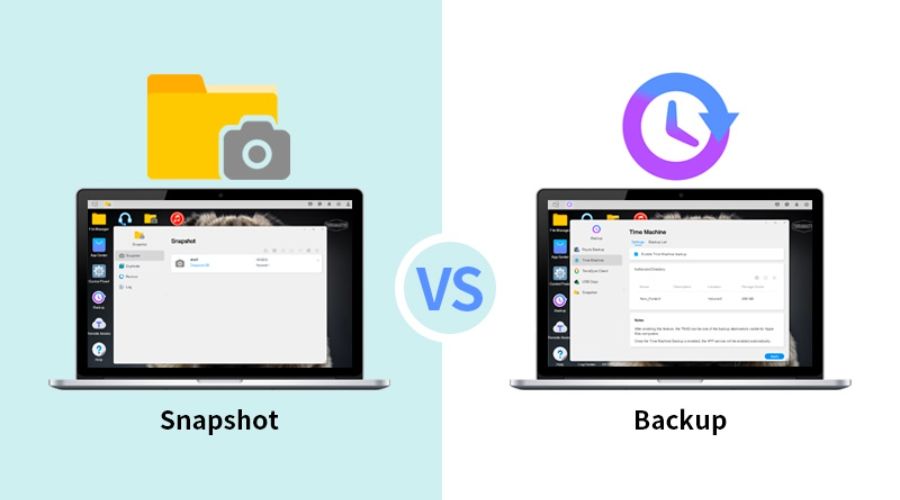
Persisted SERP data must be managed via a standardized data model, with the core being a “snapshot table (raw data) + derived metrics table (analytical data)”.
4.1 Snapshot Table Design (MySQL Example)
The snapshot table stores raw collection data, with fields covering all reproducible dimensions:
CREATE TABLE `serp_snapshot` (
  `snapshot_id` BIGINT UNSIGNED NOT NULL AUTO_INCREMENT COMMENT 'Primary key ID',
  `keyword` VARCHAR(255) NOT NULL COMMENT 'Search keyword',
  `location` VARCHAR(100) NOT NULL COMMENT 'Collection geographic location',
  `device` ENUM('mobile','desktop','tablet') NOT NULL COMMENT 'Device type',
  `user_agent` TEXT NOT NULL COMMENT 'Request UA',
  `search_engine` VARCHAR(50) NOT NULL COMMENT 'Search engine (google/bing/baidu)',
  `timestamp` DATETIME(3) NOT NULL COMMENT 'Collection time (precise to millisecond)',
  `raw_snapshot_path` VARCHAR(512) NOT NULL COMMENT 'Raw snapshot storage path (OSS/S3)',
  `parsed_data` JSON NOT NULL COMMENT 'Parsed fields (rank, title, URL, etc.)',
  `status_code` INT NOT NULL COMMENT 'Response status code',
  `create_time` DATETIME DEFAULT CURRENT_TIMESTAMP COMMENT 'Record creation time',
  PRIMARY KEY (`snapshot_id`),
  INDEX `idx_keyword_time` (`keyword`, `timestamp`) COMMENT 'Keyword + time index to accelerate queries',
  INDEX `idx_location_device` (`location`, `device`) COMMENT 'Geographic location + device index'
) ENGINE=InnoDB DEFAULT CHARSET=utf8mb4 COMMENT='SERP snapshot raw table';
4.2 Derived Metrics Table Design
The derived metrics table is calculated based on the snapshot table and used for business analysis (e.g., ranking trends, stability):
import pandas as pd
import pymysql
import json

# Database configuration
DB_CONFIG = {
    "host": "localhost",
    "user": "root",
    "password": "your_password",
    "database": "serp_analytics"
}

def get_last_snapshot_rank(keyword, target_url, location, device):
    """Retrieve the ranking of the target keyword from the last collection"""
    conn = pymysql.connect(**DB_CONFIG)
    cursor = conn.cursor(pymysql.cursors.DictCursor)

    # Query the snapshot from the previous collection
    sql = """
    SELECT parsed_data
    FROM serp_snapshot
    WHERE keyword = %s AND location = %s AND device = %s
    ORDER BY timestamp DESC LIMIT 1,1  # Skip the latest, get the previous one
    """
    cursor.execute(sql, (keyword, location, device))
    result = cursor.fetchone()

    conn.close()
    if not result:
        return None

    # Parse the ranking from the previous collection
    parsed_data = json.loads(result["parsed_data"])
    for item in parsed_data:
        if target_url in item["url"]:
            return item["rank"]
    return None

def calculate_derived_metrics(snapshot_id, keyword, target_url, location, device, current_rank):
    """Calculate derived metrics and write to the database"""
    # Get the previous ranking
    last_rank = get_last_snapshot_rank(keyword, target_url, location, device)

    # Calculate derived metrics
    rank_change = None
    top3_flag = 1 if (current_rank and current_rank <= 3) else 0
    if last_rank and current_rank:
        rank_change = current_rank - last_rank

    # Write to the database
    conn = pymysql.connect(**DB_CONFIG)
    cursor = conn.cursor()
    sql = """
    INSERT INTO serp_derived_metrics
    (snapshot_id, keyword, target_url, rank, rank_change, top3_flag)
    VALUES (%s, %s, %s, %s, %s, %s)
    """
    cursor.execute(sql, (snapshot_id, keyword, target_url, current_rank, rank_change, top3_flag))
    conn.commit()
    conn.close()

# Call example
if __name__ == "__main__":
    calculate_derived_metrics(
        snapshot_id=1001,
        keyword="Python SERP crawler",
        target_url="xxx.com/python-serp-crawler",
        location="New York",
        device="mobile",
        current_rank=5
    )
5. Audit Trail Checklist: Ensuring End-to-End Traceability of Data

5.1 Core Definition: What is End-to-End Traceability of SERP Data?
End-to-end traceability of SERP data means that for a single piece of SERP observation data, from the first second a collection task is triggered through network requests, raw snapshot capture, data parsing, cleaning/transformation, structured storage, derived metric calculation, data query/access, manual/programmatic modification, to data archiving or deletion — every operational node must satisfy:
- A globally unique identifier linking the entire lifecycle;
- Each node leaves an immutable, structured, and searchable record;
- Supports reverse traceback: From the final analytical result, trace back to the original request, raw HTML, parsing logic, operator, and modification records;
- Supports forward reproduction: Use all context in the traceability chain to replicate the data generation process 1:1.
It complements reproducibility:
- Reproducibility addresses “whether the SERP results at that time can be restored”;
- End-to-end traceability addresses “how the result was generated, who accessed it, and what actions were taken at each step”.
In enterprise-level SEO monitoring, competitor analysis, compliance audits, and ranking anomaly troubleshooting, both must be present simultaneously.
5.2 Core Business Value of End-to-End Traceability
In SERP data governance, traceability is not an add-on feature but a necessity, directly resolving high-frequency pain points:
- Root Cause Localization of Ranking Anomalies When a sudden ranking change of a target URL is detected, reverse trace from report metrics to: raw snapshots, parsing versions, collection IP/UA, request time — determining if the issue stems from environmental differences, parsing bugs, search engine fluctuations, or data tampering.
- Data Authenticity and Responsibility Attribution
- Internally: Prevent data contamination from manual errors or script bugs;
- Externally: Prove the originality and untampered nature of ranking data to clients/management.
- Iteration Traceback of Parsing/Collection Logic After updating parsing rules, historical and new data may have inconsistent calibers. The traceability chain identifies the parsing version corresponding to each piece of data, ensuring valid cross-time comparisons.
- Compliance and Audit Satisfaction Certain industries/clients require audit trails for data operations — the traceability chain serves directly as audit evidence to meet process compliance requirements.
- Rapid Troubleshooting of System Issues Collection failures, empty parsed values, and storage exceptions can be quickly diagnosed via traceability logs (e.g., network issues, proxy problems, page structure changes, or code bugs).
5.3 End-to-End Breakdown of SERP Data: Must-Trace Elements for Each Stage
The complete lifecycle of a SERP data point is divided into 8 key nodes, each requiring dedicated traceability fields and log content — detailed below:
5.3.1 Collection Task Initiation and Configuration Layer
This is the source entry of data; all subsequent data is based on parameters here.
- Must-trace content:
- Globally unique Trace ID / Request ID
- Task ID, scheduling source (scheduled task / manual trigger / API call)
- Complete collection parameters: keyword, search engine, geographic location, device type, UA, proxy IP, language, screen size
- Collection program version, configuration version number
- Task initiation time, operator / caller identifier
Example Scenario:
Abnormal data for the keyword “SEO training” was detected on a certain day. Traceability revealed the task configuration was mistakenly modified to “mobile” instead of the agreed “desktop” — directly locating the configuration error.
5.3.2 Network Request and Transmission Layer
Records how data “is sent and received” to rule out network and environmental interference.
- Must-trace content:
- Bound to the upper-layer Trace ID
- Target request URL, request method (GET/POST)
- Exit IP, proxy information (proxy IP, service provider, node region)
- Complete request headers (User-Agent, Accept-Language, Cookies, etc.)
- Request send time, response latency, HTTP status code, response headers
- Exception information (timeout, connection failure, anti-scraping interception status)
Example Scenario:
Significant differences between current and historical ranking results were found. Traceability revealed the exit IP for this collection belonged to another city — geographic targeting caused SERP deviation.
5.3.3 Raw Snapshot Capture Layer
The core anchor of traceability; raw data is the sole source of truth for all subsequent calculations.
- Must-trace content:
- Same Trace ID
- Raw data type (HTML source code, full-screen screenshot, HAR network logs)
- Snapshot storage path (local / OSS/S3), file hash (MD5/SHA1 for tamper-proofing)
- Snapshot generation time, file size
- Snapshot integrity verification result
Key Design:
Snapshots: Append-only (no overwriting/deletion allowed). Hashes are written to the database, enabling integrity verification at any time.
5.3.4 Parsing and Cleaning Layer
The conversion process from raw snapshots to structured data — a high-risk area for inconsistent data calibers.
- Must-trace content:
- Trace ID linked to snapshot ID
- Parsing script version, rule version number
- Parsing start/end time, latency
- Cleaning rules (ad removal, Baijiahao removal, organic result filtering rules)
- Parsing exceptions: missing fields, matching failures, abnormal entry counts
- Raw structured results after parsing (intermediate data without secondary calculations)
Example Scenario:
A search engine updated its page DOM structure, causing the parsing script to fail to retrieve rankings. Traceability logs recorded a failure to match the h3.t a selector — quickly identifying the need to update XPath/CSS selectors.
5.3.5 Structured Storage Layer
The stage where data is written to the database, ensuring the storage process is auditable.
- Must-trace content:
- Trace ID, snapshot ID, parsing ID associations
- Target table name, write time, number of affected rows
- Database connection identifier, write node
- Write success/failure status, error information
- Data primary key ID (snapshot_id) as the downstream association key
5.3.6 Derived Metric Calculation Layer
Business reports, ranking changes, Top3 coverage, and other metrics are calculated from raw snapshots.
- Must-trace content:
- Metric ID, associated snapshot_id
- Calculation logic version, formula
- Input parameters (comparison time window, target URL, statistical scope)
- Calculation time, calculation node, latency
- Calculation exceptions (null values, threshold breaches, missing associated data)
Key Significance:
The same raw data may yield different ranking change results with different calculation logic — the traceability chain distinguishes between “changed data” and “changed algorithms”.
Practical Recommendation: Use ELK (Elasticsearch+Logstash+Kibana) or Alibaba Cloud SLS to store audit logs, supporting real-time search and visualization.
Reference: Python Web Scraping: Using Elasticsearch for Data Cleaning
6. Link Back: Production Guide
To implement the above solution in a production environment, focus on these core points:
- Automated Collection Use Airflow/XXL-Job to set up scheduled tasks, collecting at fixed times (e.g., 9:00 AM and 3:00 PM daily) to avoid errors from manual operations.
- Storage Strategy
- Raw snapshots (HTML / screenshots): Store in object storage (Alibaba Cloud OSS / Amazon S3), organized by “year/month/day/keyword” directories;
- Structured data: Store in PostgreSQL/MySQL with scheduled backups (retain for at least 6 months);
- Permission Control
- Collection system: Only authorize crawler servers to access search engines;
- Audit logs: Only administrators can view/export; data modifications require dual approval;
- Monitoring and Alerting
- Trigger alerts when collection failure rate > 5%;
- Trigger alerts when core keyword rankings fluctuate by > 10 positions;
- Parsing Logic Versioning Record version numbers for parsing script changes and link them to the snapshot table to avoid incomparable data due to parsing logic updates.
7. Summary
- The core of SERP data reproducibility is retaining end-to-end collection context (parameters, timestamps, raw snapshots, parsed fields) to avoid misjudging ranking changes due to environmental differences;
- A standardized data model (snapshot table + derived metrics table) is the foundation for managing SERP data, while an audit trail checklist ensures data traceability and auditability;
- Production implementation requires combining automated collection, permission control, and monitoring/alerting to systematize reproducibility — rather than relying solely on manual operations.
The SERP data reproducibility system built through logging, snapshot retention, and audit trails not only resolves the business pain point of “unverifiable ranking fluctuations” but also meets core requirements for data compliance, algorithm research, and other scenarios.
Related Guides
What is a Web Scraping API? A Complete Guide for Developers
Web Crawler Technology: Principles, Architecture, Applications, and Risks
Web Crawling & Data Collection Basics Guide
A Production-Ready Guide to Using SERP API
Python Web Scraping: Using Elasticsearch for Data Cleaning
Build a Real-Time Keyword Rank Tracker with SerpAPI (Python + MongoDB)